<?xml version="1.0" encoding="utf-8"?><feed xmlns="http://www.w3.org/2005/Atom" ><generator uri="https://jekyllrb.com/" version="4.4.1">Jekyll</generator><link href="/feed.xml" rel="self" type="application/atom+xml" /><link href="/" rel="alternate" type="text/html" /><updated>2025-11-14T22:29:07+00:00</updated><id>/feed.xml</id><title type="html">Soundar Anbalagan</title><subtitle>Soundar Anbalagan&apos;s personal blog. I&apos;ve experience in building software applications from small startups to hyperscale enterprises. Here I write about my experiences, thoughts, and projects in software development and technology.</subtitle><entry><title type="html">State of Native AOT in .NET 10</title><link href="/state-of-nativeaot-net10" rel="alternate" type="text/html" title="State of Native AOT in .NET 10" /><published>2025-11-10T00:00:00+00:00</published><updated>2025-11-10T00:00:00+00:00</updated><id>/state-of-nativeaot-net10</id><content type="html" xml:base="/state-of-nativeaot-net10"><![CDATA[<p>After 3 years since <a href="https://code.soundaranbu.com/trying-out-native-aot-in-net-7-preview-7">my previous article</a> on Native AOT, let’s find out how far AOT compilation in .NET has come.</p>

<blockquote>
  <p>Please note that I’m not an expert. This article is purely based on my personal experience and knowledge from reading tons of blog posts, release announcements, doing personal experiments, and sneaking through the dotnet repo’s issues, pull requests, etc.</p>
</blockquote>

<p>Let’s dive in.</p>

<h2 id="publish-size">Publish Size</h2>

<p>First, I wanted to see the publish size, as it’s one of the main areas of focus for the .NET team. I checked the published executable size for the default console app template which just has one line:</p>

<div class="language-cs highlighter-rouge"><div class="highlight"><pre class="highlight"><code><span class="n">Console</span><span class="p">.</span><span class="nf">WriteLine</span><span class="p">(</span><span class="s">"Hello, World!"</span><span class="p">);</span>
</code></pre></div></div>

<p>Here’s the result in the last 4 versions:</p>

<table>
  <thead>
    <tr>
      <th>.NET Version</th>
      <th>App Size (MB)</th>
      <th>Size Reduction</th>
    </tr>
  </thead>
  <tbody>
    <tr>
      <td>.NET 7</td>
      <td>3.65</td>
      <td>-</td>
    </tr>
    <tr>
      <td>.NET 8</td>
      <td>1.39</td>
      <td>-61.9%</td>
    </tr>
    <tr>
      <td>.NET 9</td>
      <td>1.22</td>
      <td>-12.2%</td>
    </tr>
    <tr>
      <td>.NET 10</td>
      <td>1.05</td>
      <td>-13.9%</td>
    </tr>
  </tbody>
</table>

<p>As you can see, much of the size reduction comes in .NET 8, and it has reduced even further in subsequent releases. Now, it’s sitting around 1 MB, which is really impressive.</p>

<p>I examined the published executable using <a href="https://github.com/MichalStrehovsky/sizoscope">sizoscope</a> to see what has changed between .NET 7 &amp; 10.</p>

<p><img src="../assets/images/state-of-native-aot-net10/net7vsnet10-diff-sizoscope.png" alt="Native AOT console app sizes under sizoscope between .NET 7 and .NET 10" /></p>

<p>As we can see, each assembly shown here was trimmed down massively.</p>

<p>Enough of the “Hello World” project. Let’s move on to a real-world project.</p>

<h2 id="aspire-cli">Aspire CLI</h2>

<p><a href="https://github.com/dotnet/aspire/tree/v13.0.0/src/Aspire.Cli">Aspire CLI</a> is a native CLI executable compiled using .NET Native AOT. The latest daily(Aspire 13) build is <strong>~15 MB</strong> in size and the CLI invocation is almost instantaneous. To my knowledge, this is the first major officially supported CLI tool from Microsoft published using Native AOT, demonstrating the viability of AOT for real-world CLI scenarios. There’s more to come (dotnet CLI 👀)</p>

<h2 id="minimal-api">Minimal API</h2>

<p>Minimal API announced support for NativeAOT back in .NET 8. At the time, the ecosystem was not mature enough to deploy realistic workloads on NativeAOT. While I recognize that a lot of NuGet packages still lack NativeAOT support, it’s in a much more favorable position than it was a few years ago. If you’re developing and maintaining APIs that handle a large volume of traffic with strict SLA requirements, it’s worth exploring minimal APIs in AOT publish mode. This way, you can benefit from fast startup time, reduced memory usage, smaller app size.</p>

<p>However, note that JIT tends to achieve higher peak performance in the long run as it optimizes code at runtime. In <a href="https://bitmiracle.com/pdf-library/howto/native-aot-performance">some environments</a>, you may trade some Requests Per Second (RPS) in AOT for deterministic startup and memory profiles. So, it’s worth running benchmarks for your own APIs and seeing how it works in your case.</p>

<h2 id="aws-lambda-functions">AWS Lambda Functions</h2>

<p>AWS Lambda functions have <a href="https://docs.aws.amazon.com/lambda/latest/dg/dotnet-native-aot.html">supported Native AOT</a> since .NET 8. In their announcement <a href="https://aws.amazon.com/blogs/compute/introducing-the-net-8-runtime-for-aws-lambda/">blog post</a>:</p>

<blockquote>
  <p>“Benchmarks show up to 86% improvement in cold start times by eliminating the JIT compilation”</p>
</blockquote>

<h2 id="azure-functions">Azure Functions</h2>

<p>Azure Functions supports NativeAOT, but the functions team recommends <a href="https://learn.microsoft.com/en-us/dotnet/core/deploying/ready-to-run">Ready to Run (R2R)</a> mode to <a href="https://github.com/Azure/azure-functions-dotnet-worker/issues/2428#issuecomment-2620277971">mitigate the cold start problem</a>, as they see better results.</p>

<blockquote>
  <p>“Although Functions does have the ability to run NativeAOT compiled apps, we have a more efficient approach for cold start mitigation that is automaitcally applied (which actually leverages a combination of NativeAOT, custom .NET hosting and other technologies). That, combined with ready-to-run, yields better results in our environment than NativeAOT.”</p>
</blockquote>

<h2 id="avalonia-ui">Avalonia UI</h2>

<p>Avalonia, the popular cross-platform desktop framework, also now supports <a href="https://docs.avaloniaui.net/docs/deployment/native-aot">NativeAOT deployment</a>.</p>

<h2 id="windows-app-sdk">Windows App SDK</h2>

<p><a href="https://github.com/microsoft/WindowsAppSDK">Windows App SDK</a> 1.6 shipped with Native AOT support. From their <a href="https://blogs.windows.com/windowsdeveloper/2024/09/04/whats-new-in-windows-app-sdk-1-6/">release notes</a>:</p>

<blockquote>
  <p>“In our sample Contoso Camera app, we measured a 50% reduction in start time, an ~8x reduction in package size when using a framework package, and a ~2x reduction in package size when using Windows App SDK in self-contained mode.”</p>
</blockquote>

<p>I personally tried the <a href="https://github.com/microsoft/WinUI-Gallery/releases/tag/v2.7.0">WinUI Gallery App</a>, which was compiled with Native AOT. The app launched almost instantly and felt snappier.</p>

<h2 id="net-maui">.NET MAUI</h2>

<h3 id="windows">Windows</h3>

<p><a href="https://github.com/dotnet/maui">.NET MAUI</a> on Windows uses the Windows App SDK under the hood, and is going to get support for Native AOT publish as well. From this <a href="https://github.com/dotnet/maui/issues/31227">issue</a>, I understand it’s going to be released slightly after .NET 10, maybe as part of servicing.</p>

<h3 id="android">Android</h3>
<p><a href="https://github.com/dotnet/android/pulls?q=is%3Apr+NativeAOT+is%3Aopen">Loads of work</a> went into NativeAOT for Android in the .NET 10 release cycle and in previous releases, and it’s almost ready. <a href="https://github.com/vyacheslav-volkov">Vyacheslav Volkov</a> tested it in .NET 10 RC2 and here’s what he has to <a href="https://github.com/dotnet/runtime/issues/106748#issuecomment-3416046320">say</a>:</p>

<blockquote>
  <p>“I rebuilt my test app for .NET 10 RC2 (net10.0-android, PublishAot=true) and the results are very encouraging:
Galaxy Note 10+
Startup (with heavy initialization): 271–331 ms<br />
MonoAOT comparison: 1s27-1s41ms on the same project<br />
Everything launches and runs, and the startup speed improvement is substantial. Thank you to everyone involved for pushing this forward”</p>
</blockquote>

<h3 id="ios--mac-catalyst">iOS &amp; Mac Catalyst</h3>
<p>iOS/Mac Catalyst had AOT since the beginning using Mono. <a href="https://learn.microsoft.com/en-us/dotnet/maui/deployment/nativeaot?view=net-maui-10.0">iOS/Mac Catalyst now supports NativeAOT</a> since .NET 9, whereas experimental support was added in .NET 8.</p>

<h2 id="file-based-programs">File-based Programs</h2>

<p><a href="https://devblogs.microsoft.com/dotnet/announcing-dotnet-run-app/">File-based programs</a> is a new feature in .NET 10 where we can directly create and run C# (.cs) files. By default, <a href="https://learn.microsoft.com/en-us/dotnet/core/whats-new/dotnet-10/sdk#enhanced-file-based-apps-with-publish-support-and-native-aot">file-based apps are published in Native AOT</a> mode because the <code class="language-plaintext highlighter-rouge">PublishAot</code> flag is set to true.</p>

<p><a href="https://github.com/dotnet/sdk/issues/49189#issuecomment-2920918042">Hear</a> from <a href="https://github.com/DamianEdwards">Damian Edwards</a> (PM Architect in the .NET team):</p>

<blockquote>
  <p>“I’m considering changing my stance to be more bold on this now and say in this new world of file-based apps we could default them to publish native AOT. Be the change you want to see and all that. We likely won’t get another chance to change a default like this for a very long time.”</p>
</blockquote>

<p>This is huge because they are pushing AOT in the normal publishing flow (only for file-based programs for now). This can lead to more awareness and adoption in the community.</p>

<h2 id="net-tools">.NET Tools</h2>

<p>Before .NET 10, developers were able to publish only framework-dependent dotnet tools. From .NET 10, it is now possible to <a href="https://learn.microsoft.com/en-us/dotnet/core/whats-new/dotnet-10/sdk#platform-specific-net-tools">ship native binaries</a> compiled using Native AOT as a dotnet tool.</p>

<p>This makes the distribution of native executables easier for those who are already shipping .NET tools, and we can expect them to have faster startup times when they start using this feature.</p>

<h2 id="consolecli-frameworks">Console/CLI Frameworks</h2>

<p>It’s now possible to build fully AOT-compiled native CLI executables using some of these popular libraries:</p>
<ul>
  <li><a href="https://learn.microsoft.com/en-us/dotnet/standard/commandline/">System.CommandLine</a></li>
  <li><a href="https://github.com/spectreconsole/spectre.console">Spectre.Console</a></li>
  <li><a href="https://github.com/Cysharp/ConsoleAppFramework">ConsoleAppFramework</a></li>
  <li><a href="https://github.com/gui-cs/Terminal.Gui">Terminal.Gui</a></li>
</ul>

<h2 id="package-ecosystem">Package Ecosystem</h2>

<p>Many popular libraries have enabled support for Native AOT. Some won’t ever support it unfortunately, but alternative new packages are evolving in the ecosystem. As Native AOT adoption grows, certain patterns are becoming common to tackle the limitations:</p>

<ul>
  <li>Using C# <a href="https://github.com/dotnet/roslyn/blob/main/docs/features/incremental-generators.md">Incremental Generators</a> (v2 Source Generators) instead of reflection-based approaches.</li>
  <li>Using C# <a href="https://github.com/dotnet/roslyn/blob/main/docs/features/interceptors.md">Interceptors</a> to intercept existing code and replace it in an AOT-friendly way.</li>
  <li>Using <a href="https://learn.microsoft.com/en-us/dotnet/core/deploying/trimming/prepare-libraries-for-trimming">trimming annotations</a>, which are attributes and patterns that help the linker safely remove unused code during publish.</li>
</ul>

<p>Some of the AOT-friendly packages that I’ve come across:</p>
<ul>
  <li><a href="https://github.com/serilog/serilog">Serilog</a></li>
  <li><a href="https://github.com/App-vNext/Polly">Polly</a></li>
  <li><a href="https://github.com/microsoft/kiota">Kiota</a></li>
  <li><a href="https://github.com/octokit/dotnet-sdk">Octakit</a></li>
  <li><a href="https://github.com/nietras/Sep">Sep</a></li>
  <li><a href="https://github.com/dameng324/Dameng.SepEx">SepEx</a></li>
  <li><a href="https://learn.microsoft.com/en-us/dotnet/core/testing/unit-testing-mstest-intro">MSTest</a></li>
  <li><a href="https://github.com/StackExchange/StackExchange.Redis">StackExchange.Redis</a></li>
  <li><a href="https://github.com/open-telemetry/opentelemetry-dotnet">OpenTelemetry</a></li>
  <li><a href="https://github.com/DapperLib/DapperAOT">DapperAOT</a></li>
  <li>and the list goes on</li>
</ul>

<h4 id="azure-packages">Azure Packages</h4>

<p>More Azure packages have added support for AOT. You can see from the changelog that every month there’s a mention of trimming and AOT support:</p>
<ul>
  <li><a href="https://azure.github.io/azure-sdk/releases/2025-05/dotnet.html">https://azure.github.io/azure-sdk/releases/2025-05/dotnet.html</a></li>
  <li><a href="https://azure.github.io/azure-sdk/releases/2025-07/dotnet.html">https://azure.github.io/azure-sdk/releases/2025-07/dotnet.html</a></li>
  <li><a href="https://azure.github.io/azure-sdk/releases/2025-08/dotnet.html">https://azure.github.io/azure-sdk/releases/2025-08/dotnet.html</a></li>
  <li><a href="https://azure.github.io/azure-sdk/releases/2025-09/dotnet.html">https://azure.github.io/azure-sdk/releases/2025-09/dotnet.html</a></li>
</ul>

<p>As far as I’m aware, many of the commonly used Azure SDK packages <a href="https://github.com/Azure/azure-sdk-for-net/issues?q=is%3Aissue%20state%3Aclosed%20aot&amp;page=1">have been updated</a> with AOT support. One exception that I know of is <code class="language-plaintext highlighter-rouge">Microsoft.Azure.Cosmos</code>, <a href="https://github.com/Azure/azure-cosmos-dotnet-v3/issues/5142#issuecomment-2824830779">which may get AOT support in v4</a>.</p>

<p>I came across an interesting blog post about a CLI tool <a href="https://github.com/mburumaxwell/azddns">azddns</a> which uses some of the Azure SDKs, compiled and published as a Native AOT executable.</p>

<h4 id="new-packages">New Packages</h4>

<p>Some of the newly announced packages come with AOT support out of the box. Here are some of them that come to mind:</p>
<ul>
  <li><a href="https://learn.microsoft.com/en-us/aspnet/core/fundamentals/openapi/aspnetcore-openapi?view=aspnetcore-9.0&amp;tabs=visual-studio%2Cvisual-studio-code">Microsoft.Extensions.OpenApi</a></li>
  <li><a href="https://learn.microsoft.com/en-us/aspnet/core/release-notes/aspnetcore-10.0?view=aspnetcore-9.0#validation-support-in-minimal-apis">Microsoft.Extensions.Validation</a></li>
  <li><a href="https://github.com/modelcontextprotocol/csharp-sdk">C# MCP SDK</a> libraries</li>
  <li><a href="https://learn.microsoft.com/en-us/dotnet/ai/microsoft-extensions-ai">Microsoft.Extensions.AI</a> libraries</li>
  <li><a href="https://learn.microsoft.com/en-us/agent-framework/overview/agent-framework-overview?toc=%2Fdotnet%2Fai%2Ftoc.json&amp;bc=%2Fdotnet%2Fai%2Ftoc.json">Microsoft.Agents.AI</a></li>
</ul>

<h2 id="powertoys">PowerToys</h2>

<p>The ‘Command Palette’ utility in PowerToys started shipping in AOT compilation mode, and here’s what they say in release <em><a href="https://github.com/microsoft/PowerToys/releases/tag/v0.93.0">v0.93</a></em>:</p>

<blockquote>
  <p>“Command Palette reduced its startup memory usage by ~15%, load time by ~40%, built-in extensions loading time by ~70%, and installation size by ~55%—all due to using the full Ahead-of-Time (AOT) compilation mode in Windows App SDK.”</p>
</blockquote>

<h2 id="future">Future</h2>

<ul>
  <li><code class="language-plaintext highlighter-rouge">dotnet</code> CLI itself as a native executable? Highly likely in the next release <a href="https://github.com/dotnet/msbuild/issues/12141">https://github.com/dotnet/msbuild/issues/12141</a></li>
  <li>EF Core? Potentially in the future <a href="https://github.com/dotnet/efcore/issues/34446">https://github.com/dotnet/efcore/issues/34446</a></li>
  <li>WinForms? Maybe in the future - <a href="https://github.com/dotnet/winforms/issues/4649">https://github.com/dotnet/winforms/issues/4649</a></li>
  <li>There could be more! We’ll find out next time</li>
</ul>

<h2 id="closing-thoughts">Closing Thoughts</h2>

<p>I can see a real push for Native AOT from Microsoft and growing adoption in the .NET ecosystem, which is great to see. When I see the PRs that made Native AOT possible in many of these cases, I notice that it requires deep technical understanding of the constraints and workarounds. In some cases, it won’t be possible to support at all due to the <a href="https://learn.microsoft.com/en-us/dotnet/core/deploying/native-aot/?tabs=windows%2Cnet8#limitations-of-native-aot-deployment">limitations</a>.</p>

<p>At the end of the day, it comes down to your app and whether it works for you and you’ll benefit from it or not. In my opinion, it’s worth exploring this area if you are building CLIs, large-scale APIs, desktop or mobile applications.</p>

<p>If I have missed any other interesting project or if you’d like to share your personal experience in building AOT applications, please let me know in the comments.</p>

<p>Thanks for reading… Happy AOT’ing!</p>]]></content><author><name>Soundar Anbalagan</name></author><category term="dotnet" /><category term="nativeaot" /><summary type="html"><![CDATA[After 3 years since my previous article on Native AOT, let’s find out how far AOT compilation in .NET has come.]]></summary></entry><entry><title type="html">How to Easily Change Browser Time Zone for Testing</title><link href="/change-browser-time-zone" rel="alternate" type="text/html" title="How to Easily Change Browser Time Zone for Testing" /><published>2022-08-26T00:00:00+00:00</published><updated>2022-08-26T00:00:00+00:00</updated><id>/change-browser-time-zone</id><content type="html" xml:base="/change-browser-time-zone"><![CDATA[<p>In this article, let’s learn how to easily change the browser time zone without changing the system date and time settings.</p>

<p>Sometimes, we want to use the date and time as is from the API without any local date time conversion, convert UTC time to the local time, or do any timezone-related logic. Since developers will be working in the local timezone of their system, it’s hard for them to simulate different timezones on the fly and do the testing.</p>

<p>But not until we know this shortcut 🤔</p>

<p>Yes! It’s possible to easily simulate different timezones right inside the browser. The change takes effect immediately.</p>

<h2 id="how-to-change-time-zone-in-browser">How to Change Time Zone in Browser</h2>

<p>If you are using a chromium-based browser, head on to the Dev Tools window and look for the Sensors tab.</p>

<p>We can enable the Sensors tool from the More Tools option:</p>

<p><img src="/assets/images/change-browser-time-zone/more-tools.png" alt="Show More Tools option in the Dev Tools window" /></p>

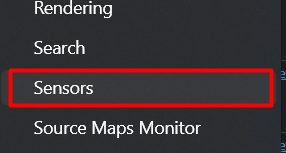
<p>And then from the list, we need to enable the Sensors tab:</p>

<p><img src="/assets/images/change-browser-time-zone/sensors-menu.png" alt="Showing Sensors tool in the 'More Tools' list" /></p>

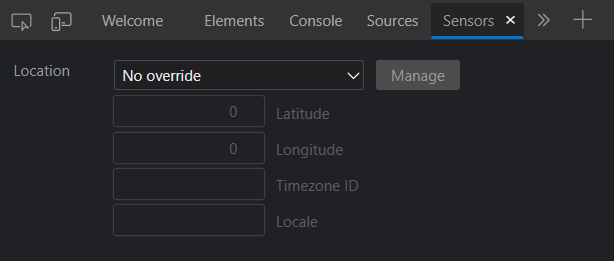
<p>We can see the option to choose the location from the dropdown:</p>

<p><img src="/assets/images/change-browser-time-zone/location-option.png" alt="Showing Sensors tool window to select the location" /></p>

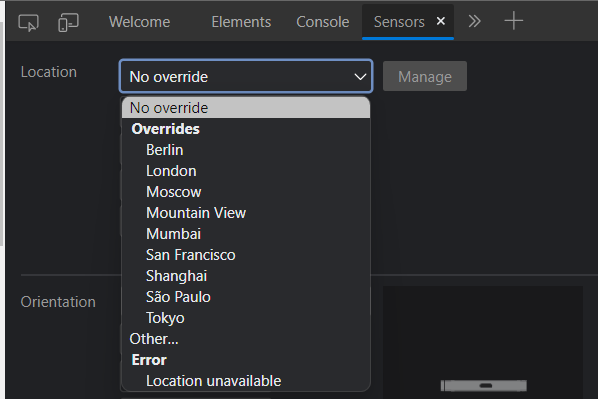
<p>By default, some locations come pre-loaded. We can select any of them or define our own:</p>

<p><img src="/assets/images/change-browser-time-zone/location-default-options.png" alt="Showing dropdown of the Locations option in the Sensors tool window" /></p>

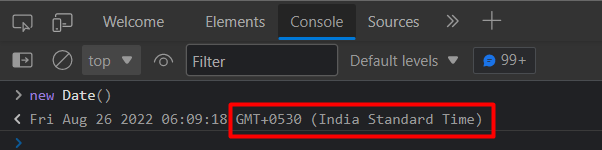
<p>Before going ahead, let’s look at the timezone information returned from the Date API in JavaScript. At this time, it returns my local timezone:</p>

<p><img src="/assets/images/change-browser-time-zone/current-timezone.png" alt="Showing the current time zone in the console window" /></p>

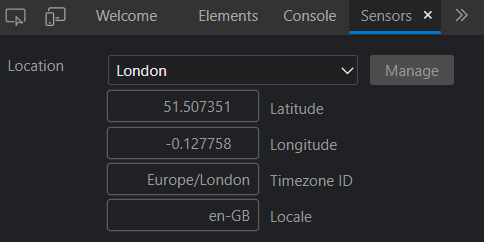
<p>Now, let’s switch to another location in the sensors tab. I’m choosing London:</p>

<p><img src="/assets/images/change-browser-time-zone/change-timezone.png" alt="Selecting London as location in the Sensors window" /></p>

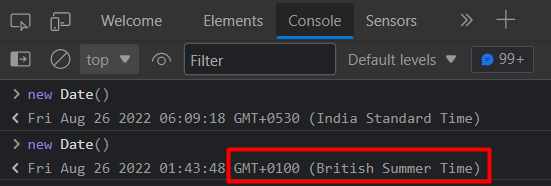
<p>If we invoke the Date API again, we can see that the timezone is changed as per our setting in the Sensors tab:</p>

<p><img src="/assets/images/change-browser-time-zone/new-timezone.png" alt="The time zone is changed to +0100 in console after the location is changed to London in Sensors window" /></p>

<h4 id="points-to-remember">Points to remember:</h4>

<ul>
  <li>We don’t need to refresh the page for this to take effect. But, if the app uses any logic on the page load time, then you may need to refresh the page.</li>
  <li>The change affects only the current tab.</li>
</ul>

<h3 id="how-to-set-custom-timezone">How to Set Custom Timezone</h3>

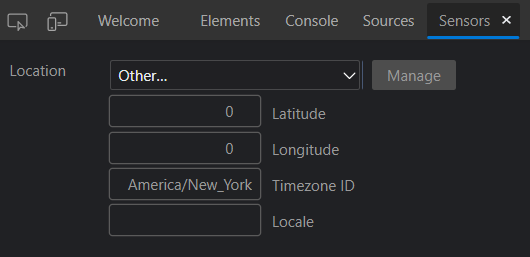
<p>In order to set any custom timezone, we need to know the Timezone ID from the <a href="https://www.iana.org/time-zones">IANA Time Zone Database</a>. You can find the list of all the timezone IDs <a href="https://nodatime.org/TimeZones">here</a>.</p>

<p>Let’s say if we want to set the timezone of New York, we need to use <code class="language-plaintext highlighter-rouge">America/New_York</code>. The GMT is -05 or -04 based on daylight savings. Since we need only the timezone change, we can leave the Latitude and Longitude as 0:</p>

<p><img src="/assets/images/change-browser-time-zone/custom-timezone.png" alt="Setting custom time zone in the Sensors window" /></p>

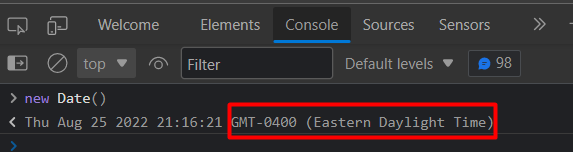
<p>If we invoke the Date API again, we can see that our required timezone is reflected:</p>

<p><img src="/assets/images/change-browser-time-zone/custom-timezone-result.png" alt="The time zone is changed in console as per the custom time zone set" /></p>

<p>In this way, we can easily change the timezone of the browser tab and test our web application.</p>

<h3 id="using-extension">Using Extension</h3>

<p>Another option is to use a browser extension which is much easier if you don’t want to play around with timezone IDs back and forth. I’ve found one such extension here:</p>

<p><a href="https://chrome.google.com/webstore/detail/change-timezone-for-googl/cejckpjfigehbeecbbfhangbknpidcnh">Change Timezone for Google Chrome Extension</a></p>

<h3 id="conclusion">Conclusion</h3>

<p>In this article, we’ve learned how to change the browser time zone for quickly testing the web application without messing around with the system settings.</p>]]></content><author><name>Soundar Anbalagan</name></author><category term="tips&amp;tricks" /><category term="web-development" /><summary type="html"><![CDATA[In this article, let’s learn how to easily change the browser time zone without changing the system date and time settings.]]></summary></entry><entry><title type="html">Trying out Native AOT in .NET 7 Preview 7</title><link href="/trying-out-native-aot-in-net-7-preview-7" rel="alternate" type="text/html" title="Trying out Native AOT in .NET 7 Preview 7" /><published>2022-08-12T00:00:00+00:00</published><updated>2022-08-12T00:00:00+00:00</updated><id>/trying-out-native-aot-in-net-7-preview-7</id><content type="html" xml:base="/trying-out-native-aot-in-net-7-preview-7"><![CDATA[<p>A few days ago, Microsoft released <a href="https://devblogs.microsoft.com/dotnet/announcing-dotnet-7-preview-7/">.NET 7 Preview 7</a>. In this release, they <a href="http://github.com/dotnet/runtime/issues/61231#issuecomment-1212649015(opens%20in%20a%20new%20tab)">finished most of the work</a> related to Native AOT that was planned for .NET 7. They are planning all the future work for Native AOT <a href="https://github.com/dotnet/runtime/issues/69739">here</a>.</p>

<p>I have been following this for a very long time. So why not give it a spin?</p>

<p>Let’s get started.</p>

<p>For .NET 7, Native AOT mainly focuses on console applications. So, let’s create a simple console application:</p>

<div class="language-sh highlighter-rouge"><div class="highlight"><pre class="highlight"><code>dotnet new console <span class="nt">-n</span> HelloWorld
</code></pre></div></div>

<p>The <code class="language-plaintext highlighter-rouge">Program.cs</code> class contains a simple statement to print “Hello, World!”:</p>

<div class="language-csharp highlighter-rouge"><div class="highlight"><pre class="highlight"><code><span class="n">Console</span><span class="p">.</span><span class="nf">WriteLine</span><span class="p">(</span><span class="s">"Hello, World!"</span><span class="p">);</span>
</code></pre></div></div>

<h2 id="publishing-as-single-file">Publishing as Single File</h2>

<p>Before proceeding to publish using Native AOT, I wanted to know how the same app looks on a single file publish.</p>

<p>So, let’s publish this application as a single file using the .NET CLI command:</p>

<div class="language-sh highlighter-rouge"><div class="highlight"><pre class="highlight"><code>dotnet publish <span class="nt">-c</span> Release <span class="nt">-r</span> win-x64 <span class="nt">-p</span>:PublishSingleFile<span class="o">=</span><span class="nb">true</span> <span class="nt">--self-contained</span> <span class="nb">true</span>
</code></pre></div></div>

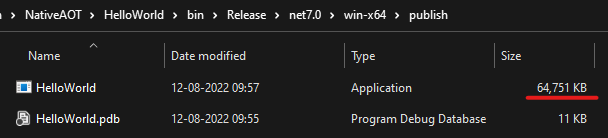
<p>Here if we look at the published output, the size is <strong>64.75 MB</strong>. But this includes not just our program but also the runtime because of the use of <code class="language-plaintext highlighter-rouge">--self-contained</code> true flag:</p>

<p><img src="../assets/images/trying-out-native-aot-in-net-7-preview-7/singlefile+selfcontained.png" alt="PublishSingleFile + SelfContaied" /></p>

<p>Let’s add one more switch <code class="language-plaintext highlighter-rouge">PublishTrimmed</code> which will remove all the unnecessary code in our application (including all the Base Class Libraries(BCL) and package references):</p>

<div class="language-sh highlighter-rouge"><div class="highlight"><pre class="highlight"><code>dotnet publish <span class="nt">-c</span> Release <span class="nt">-r</span> win-x64 <span class="nt">-p</span>:PublishSingleFile<span class="o">=</span><span class="nb">true</span> <span class="nt">-p</span>:PublishTrimmed<span class="o">=</span><span class="nb">true</span> <span class="nt">--self-contained</span> <span class="nb">true</span>
</code></pre></div></div>

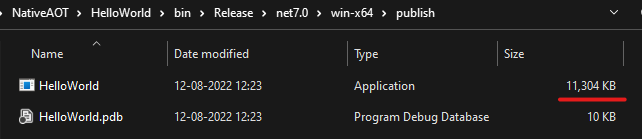
<p>Now, the <code class="language-plaintext highlighter-rouge">PublishTrimmed</code> option significantly reduces the size to <strong>11.30 MB</strong>!</p>

<p><img src="../assets/images/trying-out-native-aot-in-net-7-preview-7/singlefile+trimmed+selfcontained.png" alt="PublishSingleFile + PublishTrimmed + SelfContaied" /></p>

<p>Single file publish includes all the assemblies in a single file. Therefore, it makes the app distribution easier.</p>

<p>But the published output contains Intermediate Language (IL). JIT compiler needs to convert it to native code at runtime. This works great for most scenarios. But it’s not ideal for resource-constrained environments and where the application startup time is crucial.</p>

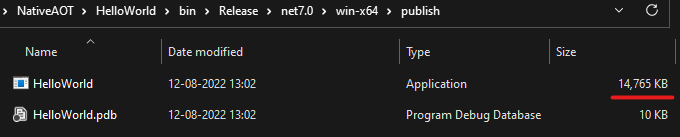
<p>Let’s add one more switch <code class="language-plaintext highlighter-rouge">PublishReadyToRun</code>. <a href="https://docs.microsoft.com/en-us/dotnet/core/deploying/ready-to-run">R2R</a> improves the startup performance by compiling the code on the startup path directly to native code. R2R places the native code alongside the IL. Hence, there is a slight increase in the published application size (<strong>14.76 MB</strong>):</p>

<p><img src="../assets/images/trying-out-native-aot-in-net-7-preview-7/singlefile+trimmed+r2r+selfcontained.png" alt="Published output for PublishSingleFile + PublishTrimmed + PublishReadyToRun + SelfContaied options" /></p>

<h2 id="publishing-as-native-aot">Publishing as Native AOT</h2>

<p>Unlike R2R, <a href="https://docs.microsoft.com/en-us/dotnet/core/deploying/native-aot">Native AOT</a> complies entire application to native code just like C++, Go, Rust, and similar others.</p>

<p>Now, let’s go ahead and publish the same console application as Native AOT using the PublishAot MSBuild property:</p>

<div class="language-sh highlighter-rouge"><div class="highlight"><pre class="highlight"><code>dotnet publish <span class="nt">-c</span> Release <span class="nt">-r</span> win-x64 <span class="nt">-p</span>:PublishAot<span class="o">=</span><span class="nb">true</span>
</code></pre></div></div>

<p>Alternatively, we can specify the property in .csproj file as well:</p>

<div class="language-xml highlighter-rouge"><div class="highlight"><pre class="highlight"><code><span class="nt">&lt;PropertyGroup&gt;</span>
    <span class="nt">&lt;PublishAot&gt;</span>true<span class="nt">&lt;/PublishAot&gt;</span>
<span class="nt">&lt;/PropertyGroup&gt;</span>
</code></pre></div></div>

<div class="markdown-alert markdown-alert-important"><p class="markdown-alert-title"><svg class="octicon octicon-report" viewBox="0 0 16 16" version="1.1" width="16" height="16" aria-hidden="true"><path d="M0 1.75C0 .784.784 0 1.75 0h12.5C15.216 0 16 .784 16 1.75v9.5A1.75 1.75 0 0 1 14.25 13H8.06l-2.573 2.573A1.458 1.458 0 0 1 3 14.543V13H1.75A1.75 1.75 0 0 1 0 11.25Zm1.75-.25a.25.25 0 0 0-.25.25v9.5c0 .138.112.25.25.25h2a.75.75 0 0 1 .75.75v2.19l2.72-2.72a.749.749 0 0 1 .53-.22h6.5a.25.25 0 0 0 .25-.25v-9.5a.25.25 0 0 0-.25-.25Zm7 2.25v2.5a.75.75 0 0 1-1.5 0v-2.5a.75.75 0 0 1 1.5 0ZM9 9a1 1 0 1 1-2 0 1 1 0 0 1 2 0Z"></path></svg> Important</p><p>Before going ahead, we need to install Desktop Development for C++ workload through Visual Studio Installer. Otherwise, an error will be thrown:
C:\Program Files\dotnet\sdk\7.0.100-preview.7.22377.5\Sdks\Microsoft.DotNet.ILCompiler\build\Microsoft.NETCore.Native.Windows.targets(115,5): error : Platform linker not found. To fix this problem, download and install Visual Studio 2022 from http://visualstudio.com. Make sure to install the Desktop Development for C++ workload. For ARM64 development also install C++ ARM64 build tools. [D:\HandsOn\NativeAOT\HelloWorld\HelloWorld.csproj]</p>
</div>

<p>After running the command, with obj and bin folders removed, it took me under 9 seconds to produce the native binary. But later, it took me under 3 seconds:</p>

<p><img src="../assets/images/trying-out-native-aot-in-net-7-preview-7/publish-aot.png" alt="Published output for PublishAot option" /></p>

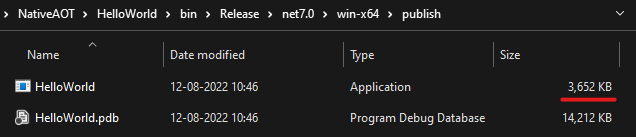
<p>Impressive! the application size is only 3.65 MB! The published output is purely native. No Intermediate Language (IL) is present. But why 3.65 MB for a simple “Hello, World!” application you might ask? Well, these results are for good defaults. But, we can further reduce this size. Please look for optimizations <a href="https://github.com/dotnet/runtime/blob/main/src/coreclr/nativeaot/docs/optimizing.md">here</a>.</p>

<p>What about something more than just a “Hello, World!” project? Well, here’s a tweet from <a href="https://x.com/MStrehovsky">@MStrehovsky</a>:</p>

<blockquote class="twitter-tweet"><p lang="en" dir="ltr">The best part of this? `PublishTrimmed` now actually means &quot;publish the whole app trimmed&quot;. Here&#39;s size numbers for a sample app that uses ImageSharp to save a PNG file before and after Preview 7. The NativeAOT numbers are especially nice. <a href="https://t.co/hNw0nanFVd">https://t.co/hNw0nanFVd</a> <a href="https://t.co/lYxkQUuMXU">pic.twitter.com/lYxkQUuMXU</a></p>&mdash; Michal Strehovský (@MStrehovsky) <a href="https://twitter.com/MStrehovsky/status/1557206724700143617?ref_src=twsrc%5Etfw">August 10, 2022</a></blockquote>
<script async="" src="https://platform.twitter.com/widgets.js" charset="utf-8"></script>

<p>We know this is just the beginning and there’s more to come. I just can’t wait to see more real-world projects making use of Native AOT and show us their results. Are you building a cool project using Native AOT? Please let everyone know in the comments!</p>

<p>Also, let’s take a moment to appreciate all the people who were involved in getting this feature out for all of us!</p>

<p>If you wish to read more on publishing using Native AOT, Microsoft has detailed documentation <a href="https://docs.microsoft.com/en-us/dotnet/core/deploying/native-aot">here</a>.</p>

<p>Happy Coding 🙂</p>]]></content><author><name>Soundar Anbalagan</name></author><category term="dotnet" /><category term="nativeaot" /><summary type="html"><![CDATA[A few days ago, Microsoft released .NET 7 Preview 7. In this release, they finished most of the work related to Native AOT that was planned for .NET 7. They are planning all the future work for Native AOT here. I have been following this for a very long time. So why not give it a spin? Let’s get started. For .NET 7, Native AOT mainly focuses on console applications. So, let’s create a simple console application: dotnet new console -n HelloWorld The Program.cs class contains a simple statement to print “Hello, World!”: Console.WriteLine("Hello, World!"); Publishing as Single File Before proceeding to publish using Native AOT, I wanted to know how the same app looks on a single file publish. So, let’s publish this application as a single file using the .NET CLI command: dotnet publish -c Release -r win-x64 -p:PublishSingleFile=true --self-contained true Here if we look at the published output, the size is 64.75 MB. But this includes not just our program but also the runtime because of the use of --self-contained true flag: Let’s add one more switch PublishTrimmed which will remove all the unnecessary code in our application (including all the Base Class Libraries(BCL) and package references): dotnet publish -c Release -r win-x64 -p:PublishSingleFile=true -p:PublishTrimmed=true --self-contained true Now, the PublishTrimmed option significantly reduces the size to 11.30 MB! Single file publish includes all the assemblies in a single file. Therefore, it makes the app distribution easier. But the published output contains Intermediate Language (IL). JIT compiler needs to convert it to native code at runtime. This works great for most scenarios. But it’s not ideal for resource-constrained environments and where the application startup time is crucial. Let’s add one more switch PublishReadyToRun. R2R improves the startup performance by compiling the code on the startup path directly to native code. R2R places the native code alongside the IL. Hence, there is a slight increase in the published application size (14.76 MB): Publishing as Native AOT Unlike R2R, Native AOT complies entire application to native code just like C++, Go, Rust, and similar others. Now, let’s go ahead and publish the same console application as Native AOT using the PublishAot MSBuild property: dotnet publish -c Release -r win-x64 -p:PublishAot=true Alternatively, we can specify the property in .csproj file as well: &lt;PropertyGroup&gt; &lt;PublishAot&gt;true&lt;/PublishAot&gt; &lt;/PropertyGroup&gt; [!IMPORTANT] Before going ahead, we need to install Desktop Development for C++ workload through Visual Studio Installer. Otherwise, an error will be thrown: C:\Program Files\dotnet\sdk\7.0.100-preview.7.22377.5\Sdks\Microsoft.DotNet.ILCompiler\build\Microsoft.NETCore.Native.Windows.targets(115,5): error : Platform linker not found. To fix this problem, download and install Visual Studio 2022 from http://visualstudio.com. Make sure to install the Desktop Development for C++ workload. For ARM64 development also install C++ ARM64 build tools. [D:\HandsOn\NativeAOT\HelloWorld\HelloWorld.csproj] After running the command, with obj and bin folders removed, it took me under 9 seconds to produce the native binary. But later, it took me under 3 seconds: Impressive! the application size is only 3.65 MB! The published output is purely native. No Intermediate Language (IL) is present. But why 3.65 MB for a simple “Hello, World!” application you might ask? Well, these results are for good defaults. But, we can further reduce this size. Please look for optimizations here. What about something more than just a “Hello, World!” project? Well, here’s a tweet from @MStrehovsky: The best part of this? `PublishTrimmed` now actually means &quot;publish the whole app trimmed&quot;. Here&#39;s size numbers for a sample app that uses ImageSharp to save a PNG file before and after Preview 7. The NativeAOT numbers are especially nice. https://t.co/hNw0nanFVd pic.twitter.com/lYxkQUuMXU&mdash; Michal Strehovský (@MStrehovsky) August 10, 2022 We know this is just the beginning and there’s more to come. I just can’t wait to see more real-world projects making use of Native AOT and show us their results. Are you building a cool project using Native AOT? Please let everyone know in the comments! Also, let’s take a moment to appreciate all the people who were involved in getting this feature out for all of us! If you wish to read more on publishing using Native AOT, Microsoft has detailed documentation here. Happy Coding 🙂]]></summary></entry><entry><title type="html">Convert HTML to PDF in ASP.NET Core</title><link href="/convert-html-to-pdf-in-asp-net-core" rel="alternate" type="text/html" title="Convert HTML to PDF in ASP.NET Core" /><published>2021-05-21T00:00:00+00:00</published><updated>2021-05-21T00:00:00+00:00</updated><id>/convert-html-to-pdf-in-asp-net-core</id><content type="html" xml:base="/convert-html-to-pdf-in-asp-net-core"><![CDATA[<p>Generating PDF files is a common use case. Sometimes, there will be a need to send dynamically generated pdf attachments(like bank statements, invoices, and more) over email or give PDF export/download option to the users in the web portal or in the mobile app via API call.</p>

<p>PDF can be designed &amp; generated using popular libraries like iTextSharp. But they are quite complicated and time-consuming to achieve the expected design. But if you are a web developer already, you will find it easy and quick to design with HTML &amp; CSS and later convert it to PDF.</p>

<p>Let’s move on to see how to generate PDF from HTML in ASP.NET Core running on .NET 5.</p>

<p>There are two parts to this.</p>

<ul>
  <li>Generating dynamic HTML string —  using Razor.Templating.Core. (With the power of Razor language which is already being used in MVC views)</li>
  <li>Converting HTML to PDF  — using jsreport</li>
</ul>

<h2 id="generating-html">Generating HTML</h2>
<p>Let’s create a new solution using the .NET CLI command. One can use Visual Studio as well.</p>

<div class="language-sh highlighter-rouge"><div class="highlight"><pre class="highlight"><code>dotnet new sln <span class="nt">-n</span> HtmlToPdf
</code></pre></div></div>
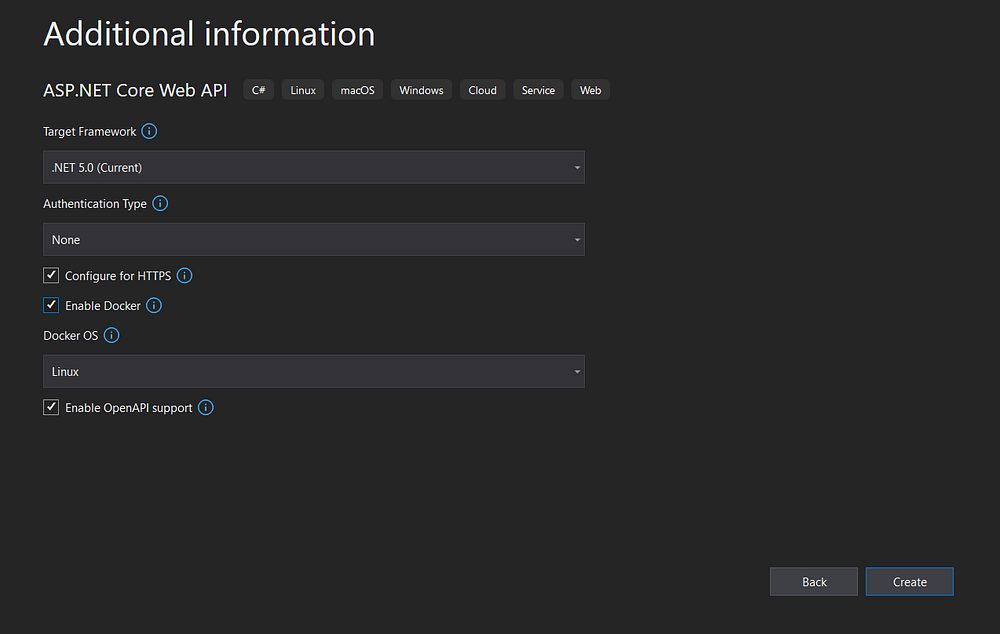
<p>I’ve added a new ASP.NET Core Web API project to the solution as below</p>

<p><img src="../assets/images/convert-html-to-pdf-in-asp-net-core/create-api-project.png" alt="Creating Api Project" /></p>

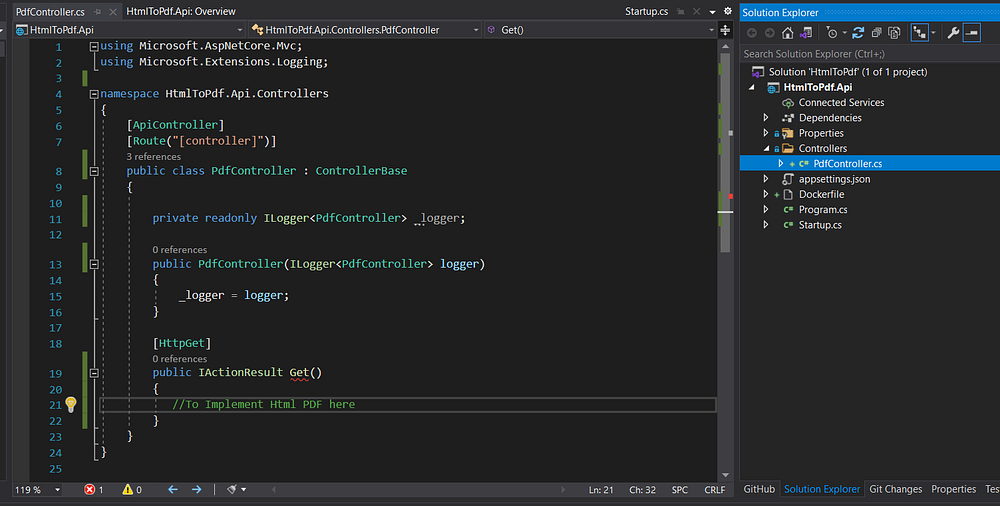
<p>I removed the default files Weatherforcast.cs &amp; WeatherForecastController.cs</p>

<p>and added <code class="language-plaintext highlighter-rouge">PdfController.cs</code> with one Get action method which looks like this.</p>

<p><img src="../assets/images/convert-html-to-pdf-in-asp-net-core/add-pdfcontroller.png" alt="Add PDF Controller" /></p>

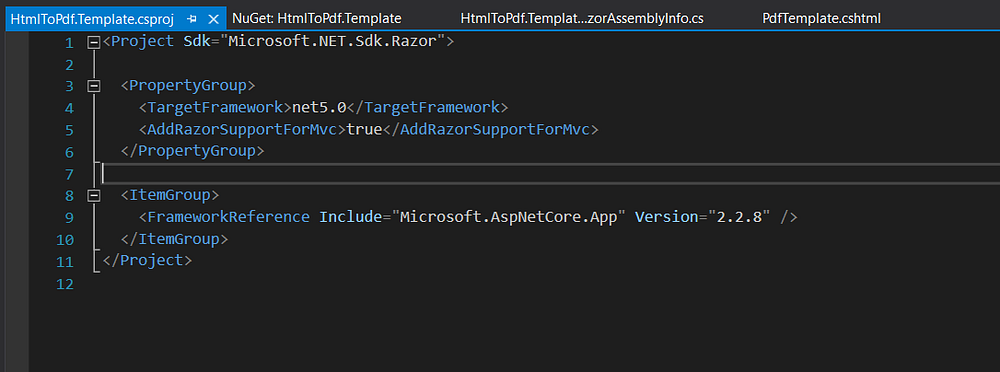
<p>Next, I added a Razor Class Library(RCL) project named HtmlToPdf.Template to create HTML template for our pdf.</p>

<p>HtmlToPdf.Template.csproj file should look like the below. If not please change as below.</p>

<p>I grabbed some HTML from <a href="https://dev.to/dshannon/create-a-responsive-bootstrap-invoice-21n6">here</a> created by <a href="https://dev.to/dshannon">Daryl Shannon</a> and added it to <code class="language-plaintext highlighter-rouge">PdfTemplate.cshtml</code> file under the Views folder.</p>

<p><img src="../assets/images/convert-html-to-pdf-in-asp-net-core/template-project.png" alt="Template Project" /></p>

<p>I’ll add a reference to the <code class="language-plaintext highlighter-rouge">HtmlToPdf.Template</code> project to <code class="language-plaintext highlighter-rouge">HtmlToPdf.Api</code></p>

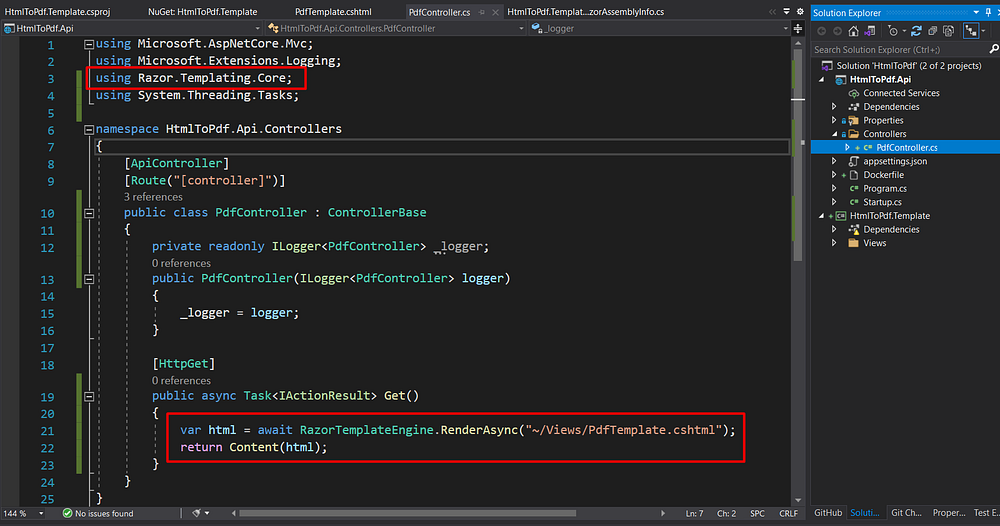
<p>Also, I’ll install <a href="https://github.com/soundaranbu/Razor.Templating.Core">Razor.Templating.Core</a> NuGet package to <code class="language-plaintext highlighter-rouge">HtmlToPdf.Api</code> project to render the PdfTemplate.cshtml file to a string. One good thing about this package is that we can even pass the view model to render the HTML string dynamically. For complete guidance on using this package, refer to this article. For simplicity’s sake, I’ll simply render the static HTML.</p>

<p>Now, all I need to do is to call the <code class="language-plaintext highlighter-rouge">await RazorTemplateEngine.RenderAsync("~/Views/PdfTemplate.cshtml"</code>)` method to render the string out of .cshtml file</p>

<p><img src="../assets/images/convert-html-to-pdf-in-asp-net-core/rendering-with-razor-templating-core.png" alt="Rendering with Razor.Templating.Core" /></p>

<p>Let’s quickly run the API project &amp; see if the .cshtml to string works.</p>

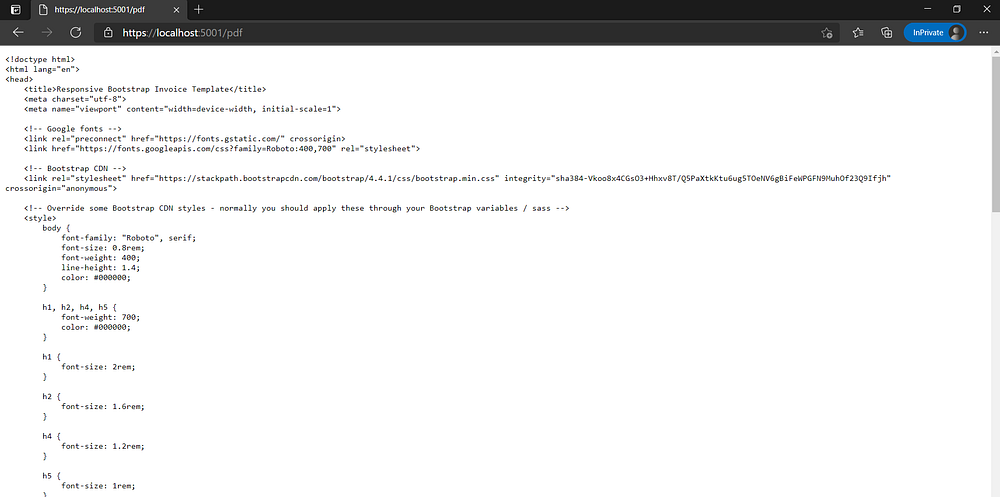
<p><img src="../assets/images/convert-html-to-pdf-in-asp-net-core/html-output.png" alt="HTML Output" /></p>

<p>YES! Now we have the html string in hand.</p>

<h2 id="html-to-pdf">HTML To PDF</h2>
<p>I’ll be using JsReport library to convert HTML to PDF. Add the following references to your HtmlToPdf.Api.csproj</p>

<div class="markdown-alert markdown-alert-important"><p class="markdown-alert-title"><svg class="octicon octicon-report" viewBox="0 0 16 16" version="1.1" width="16" height="16" aria-hidden="true"><path d="M0 1.75C0 .784.784 0 1.75 0h12.5C15.216 0 16 .784 16 1.75v9.5A1.75 1.75 0 0 1 14.25 13H8.06l-2.573 2.573A1.458 1.458 0 0 1 3 14.543V13H1.75A1.75 1.75 0 0 1 0 11.25Zm1.75-.25a.25.25 0 0 0-.25.25v9.5c0 .138.112.25.25.25h2a.75.75 0 0 1 .75.75v2.19l2.72-2.72a.749.749 0 0 1 .53-.22h6.5a.25.25 0 0 0 .25-.25v-9.5a.25.25 0 0 0-.25-.25Zm7 2.25v2.5a.75.75 0 0 1-1.5 0v-2.5a.75.75 0 0 1 1.5 0ZM9 9a1 1 0 1 1-2 0 1 1 0 0 1 2 0Z"></path></svg> Note</p><p>Reference to jsreport.Binary.Linux is not required if you are not hosting in Linux machines
<code class="language-plaintext highlighter-rouge"></code></p>
</div>

<p>Use the following code to generate the PDF out of HTML string &amp; return the file in the API.</p>

<div class="language-csharp highlighter-rouge"><div class="highlight"><pre class="highlight"><code><span class="p">[</span><span class="nf">HttpGet</span><span class="p">()]</span>
<span class="k">public</span> <span class="k">async</span> <span class="n">Task</span><span class="p">&lt;</span><span class="n">IActionResult</span><span class="p">&gt;</span> <span class="nf">Get</span><span class="p">()</span>
<span class="p">{</span>
    <span class="kt">var</span> <span class="n">html</span> <span class="p">=</span> <span class="k">await</span> <span class="n">RazorTemplateEngine</span><span class="p">.</span><span class="nf">RenderAsync</span><span class="p">(</span><span class="s">"~/Views/PdfTemplate.cshtml"</span><span class="p">);</span>
    <span class="kt">var</span> <span class="n">rs</span> <span class="p">=</span> <span class="k">new</span> <span class="nf">LocalReporting</span><span class="p">()</span>
                <span class="p">.</span><span class="nf">KillRunningJsReportProcesses</span><span class="p">()</span>
                <span class="p">.</span><span class="nf">UseBinary</span><span class="p">(</span><span class="n">RuntimeInformation</span><span class="p">.</span><span class="nf">IsOSPlatform</span><span class="p">(</span><span class="n">OSPlatform</span><span class="p">.</span><span class="n">Windows</span><span class="p">)</span> <span class="p">?</span> <span class="n">JsReportBinary</span><span class="p">.</span><span class="nf">GetBinary</span><span class="p">()</span> <span class="p">:</span> <span class="n">jsreport</span><span class="p">.</span><span class="n">Binary</span><span class="p">.</span><span class="n">Linux</span><span class="p">.</span><span class="n">JsReportBinary</span><span class="p">.</span><span class="nf">GetBinary</span><span class="p">())</span>
                <span class="p">.</span><span class="nf">Configure</span><span class="p">(</span><span class="n">cfg</span> <span class="p">=&gt;</span> <span class="n">cfg</span><span class="p">.</span><span class="nf">AllowedLocalFilesAccess</span><span class="p">().</span><span class="nf">FileSystemStore</span><span class="p">().</span><span class="nf">BaseUrlAsWorkingDirectory</span><span class="p">())</span>
                <span class="p">.</span><span class="nf">AsUtility</span><span class="p">()</span>
                <span class="p">.</span><span class="nf">Create</span><span class="p">();</span>
    <span class="kt">var</span> <span class="n">generatedPdf</span> <span class="p">=</span> <span class="k">await</span> <span class="n">rs</span><span class="p">.</span><span class="nf">RenderAsync</span><span class="p">(</span><span class="k">new</span> <span class="n">RenderRequest</span>
    <span class="p">{</span>
        <span class="n">Template</span> <span class="p">=</span> <span class="k">new</span> <span class="n">Template</span>
        <span class="p">{</span>
            <span class="n">Recipe</span> <span class="p">=</span> <span class="n">Recipe</span><span class="p">.</span><span class="n">ChromePdf</span><span class="p">,</span>
            <span class="n">Engine</span> <span class="p">=</span> <span class="n">Engine</span><span class="p">.</span><span class="n">None</span><span class="p">,</span>
            <span class="n">Content</span> <span class="p">=</span> <span class="n">html</span><span class="p">,</span>
            <span class="n">Chrome</span> <span class="p">=</span> <span class="k">new</span> <span class="n">Chrome</span>
            <span class="p">{</span>
                <span class="n">MarginTop</span> <span class="p">=</span> <span class="s">"10"</span><span class="p">,</span>
                <span class="n">MarginBottom</span> <span class="p">=</span> <span class="s">"10"</span><span class="p">,</span>
                <span class="n">MarginLeft</span> <span class="p">=</span> <span class="s">"50"</span><span class="p">,</span>
                <span class="n">MarginRight</span> <span class="p">=</span> <span class="s">"50"</span>
            <span class="p">}</span>
        <span class="p">}</span>
    <span class="p">});</span>
    <span class="k">return</span> <span class="nf">File</span><span class="p">(</span><span class="n">generatedPdf</span><span class="p">.</span><span class="n">Content</span><span class="p">,</span> <span class="n">generatedPdf</span><span class="p">.</span><span class="n">Meta</span><span class="p">.</span><span class="n">ContentType</span><span class="p">,</span> <span class="s">"GeneratedPdfFile.pdf"</span><span class="p">);</span>
<span class="p">}</span>
</code></pre></div></div>
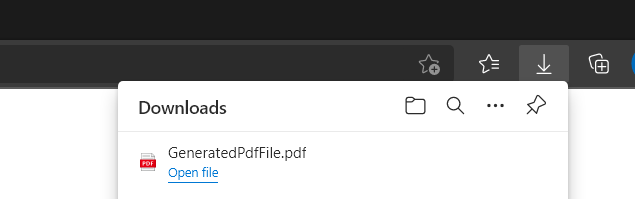
<p>If we run the api &amp; hit https://localhost:5001/pdf, we can notice that the pdf file is downloaded!
<img src="../assets/images/convert-html-to-pdf-in-asp-net-core/file-downloaded-as-pdf.png" alt="File downloaded as PDF" /></p>

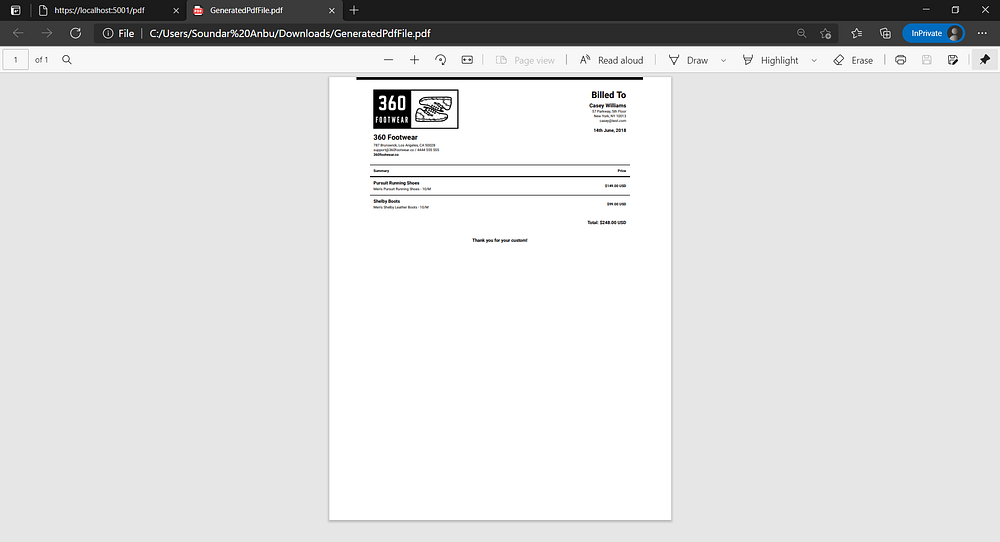
<p>Let’s look how does the pdf file look like
<img src="../assets/images/convert-html-to-pdf-in-asp-net-core/pdf-preview.png" alt="PDF Preview" /></p>

<p>Voila!! Now we’ve rendered the HTML string into PDF.</p>
<div class="markdown-alert markdown-alert-important"><p class="markdown-alert-title"><svg class="octicon octicon-report" viewBox="0 0 16 16" version="1.1" width="16" height="16" aria-hidden="true"><path d="M0 1.75C0 .784.784 0 1.75 0h12.5C15.216 0 16 .784 16 1.75v9.5A1.75 1.75 0 0 1 14.25 13H8.06l-2.573 2.573A1.458 1.458 0 0 1 3 14.543V13H1.75A1.75 1.75 0 0 1 0 11.25Zm1.75-.25a.25.25 0 0 0-.25.25v9.5c0 .138.112.25.25.25h2a.75.75 0 0 1 .75.75v2.19l2.72-2.72a.749.749 0 0 1 .53-.22h6.5a.25.25 0 0 0 .25-.25v-9.5a.25.25 0 0 0-.25-.25Zm7 2.25v2.5a.75.75 0 0 1-1.5 0v-2.5a.75.75 0 0 1 1.5 0ZM9 9a1 1 0 1 1-2 0 1 1 0 0 1 2 0Z"></path></svg> Pro Tip</p><p>One can use the JsReport Playground to quickly design the HTML &amp; see the pdf output in real-time. Later, we can grab that HTML to add to our .cshtml file.</p>
</div>

<h2 id="running-on-linux-using-docker">Running on Linux using Docker</h2>

<p>As we know, ASP.NET Core &amp; JsReport are cross-platform, one might want to host it on a Linux server. Initially, it was a pain for me to write the Dockerfile to install the required dependencies for jsreport. Though, there were some examples. I had to face some rough edges. After googling &amp; installing the required dependencies, I was able to successfully host it on a Linux machine(I used Ubuntu 20.04 here)</p>

<p>Here’s the Dockerfile.</p>

<div class="language-Dockerfile highlighter-rouge"><div class="highlight"><pre class="highlight"><code><span class="k">FROM</span><span class="w"> </span><span class="s">mcr.microsoft.com/dotnet/aspnet:5.0</span><span class="w"> </span><span class="k">AS</span><span class="w"> </span><span class="s">base</span>
<span class="k">RUN </span>apt-get update
<span class="c"># for jsreport</span>
<span class="c"># install chrome with deps, see https://github.com/jsreport/jsreport/blob/master/docker/full/Dockerfile</span>
<span class="k">RUN </span>apt-get <span class="nb">install</span> <span class="nt">-y</span> <span class="nt">--no-install-recommends</span> libgconf-2-4 gnupg git curl wget ca-certificates libgconf-2-4 <span class="o">&amp;&amp;</span> <span class="se">\
</span>wget <span class="nt">-q</span> <span class="nt">-O</span> - https://dl-ssl.google.com/linux/linux_signing_key.pub | apt-key add - <span class="o">&amp;&amp;</span> <span class="se">\
</span>sh <span class="nt">-c</span> <span class="s1">'echo "deb [arch=amd64] http://dl.google.com/linux/chrome/deb/ stable main" &gt;&gt; /etc/apt/sources.list.d/google.list'</span> <span class="o">&amp;&amp;</span> <span class="se">\
</span>apt-get update <span class="o">&amp;&amp;</span> <span class="se">\
</span>apt-get <span class="nb">install</span> <span class="nt">-y</span> lsb-release google-chrome-stable fonts-ipafont-gothic fonts-wqy-zenhei fonts-thai-tlwg fonts-kacst libxtst6 libxss1 <span class="nt">--no-install-recommends</span>
<span class="k">RUN </span>apt-get <span class="nb">install</span> <span class="nt">-y</span> gconf-service libxext6 libxfixes3 libxi6 libxrandr2 libxrender1 libcairo2 libcups2 libdbus-1-3 libexpat1 libfontconfig1 libgcc1 libgconf-2-4 libgdk-pixbuf2.0-0 libglib2.0-0 libgtk-3-0 libnspr4 libpango-1.0-0 libpangocairo-1.0-0 libstdc++6 libx11-6 libx11-xcb1 libxcb1 libxcomposite1 libxcursor1 libxdamage1 libxss1 libxtst6 libappindicator1 libnss3 libasound2 libatk1.0-0 libc6 ca-certificates fonts-liberation lsb-release xdg-utils wget
<span class="k">ENV</span><span class="s"> chrome_launchOptions_executablePath google-chrome-stable</span>
<span class="k">ENV</span><span class="s"> chrome_launchOptions_args --no-sandbox,--disable-dev-shm-usage,--single-process,--no-zygote</span>
<span class="k">WORKDIR</span><span class="s"> /app</span>
<span class="k">EXPOSE</span><span class="s"> 80</span>
<span class="k">EXPOSE</span><span class="s"> 443</span>
<span class="k">FROM</span><span class="w"> </span><span class="s">mcr.microsoft.com/dotnet/sdk:5.0</span><span class="w"> </span><span class="k">AS</span><span class="w"> </span><span class="s">build</span>
<span class="k">WORKDIR</span><span class="s"> /src</span>
<span class="k">COPY</span><span class="s"> ["HtmlToPdf.Api/HtmlToPdf.Api.csproj", "HtmlToPdf.Api/"]</span>
<span class="k">RUN </span>dotnet restore <span class="s2">"HtmlToPdf.Api/HtmlToPdf.Api.csproj"</span>
<span class="k">COPY</span><span class="s"> . .</span>
<span class="k">WORKDIR</span><span class="s"> "/src/HtmlToPdf.Api"</span>
<span class="k">RUN </span>dotnet build <span class="s2">"HtmlToPdf.Api.csproj"</span> <span class="nt">-c</span> Release <span class="nt">-o</span> /app/build
<span class="k">FROM</span><span class="w"> </span><span class="s">build</span><span class="w"> </span><span class="k">AS</span><span class="w"> </span><span class="s">publish</span>
<span class="k">RUN </span>dotnet publish <span class="s2">"HtmlToPdf.Api.csproj"</span> <span class="nt">-c</span> Release <span class="nt">-o</span> /app/publish
<span class="k">FROM</span><span class="w"> </span><span class="s">base</span><span class="w"> </span><span class="k">AS</span><span class="w"> </span><span class="s">final</span>
<span class="k">WORKDIR</span><span class="s"> /app</span>
<span class="k">COPY</span><span class="s"> --from=publish /app/publish .</span>
<span class="k">ENTRYPOINT</span><span class="s"> ["dotnet", "HtmlToPdf.Api.dll"]</span>
</code></pre></div></div>
<h2 id="key-takeaways">Key Takeaways</h2>
<p>If you want to generate the PDF in a background service or console application, that can also be done. Instead of ASP.NET Core, one needs to create the Worker Service or Console application and use the same project reference and code.
You might notice that it takes 1 or more seconds to generate the PDF as jsreport is using a headless chrome browser on the server to generate the PDF from HTML. Generally, that should be ok.
You might be surprised to see that the Docker image size is around 1GB when you add jsreport whereas the normal size is around 100MB. It’s because the image needs to have chrome dependencies. I believe this can be optimized.
Full code available here: <a href="https://github.com/soundaranbu/Razor.Templating.Core/tree/main/examples/_RealWorldSamples/HtmlToPdf">RazorTemplating/examples/_RealWorldSamples/HtmlToPdf</a> at master · soundaranbu/RazorTemplating (github.com)</p>

<p>Hope this article is helpful. Let’s meet in another one. Thanks!</p>

<p>Happy Coding 🙂</p>]]></content><author><name>Soundar Anbalagan</name></author><category term="aspnetcore" /><summary type="html"><![CDATA[Generating PDF files is a common use case. Sometimes, there will be a need to send dynamically generated pdf attachments(like bank statements, invoices, and more) over email or give PDF export/download option to the users in the web portal or in the mobile app via API call. PDF can be designed &amp; generated using popular libraries like iTextSharp. But they are quite complicated and time-consuming to achieve the expected design. But if you are a web developer already, you will find it easy and quick to design with HTML &amp; CSS and later convert it to PDF. Let’s move on to see how to generate PDF from HTML in ASP.NET Core running on .NET 5. There are two parts to this. Generating dynamic HTML string —  using Razor.Templating.Core. (With the power of Razor language which is already being used in MVC views) Converting HTML to PDF  — using jsreport Generating HTML Let’s create a new solution using the .NET CLI command. One can use Visual Studio as well. dotnet new sln -n HtmlToPdf I’ve added a new ASP.NET Core Web API project to the solution as below I removed the default files Weatherforcast.cs &amp; WeatherForecastController.cs and added PdfController.cs with one Get action method which looks like this. Next, I added a Razor Class Library(RCL) project named HtmlToPdf.Template to create HTML template for our pdf. HtmlToPdf.Template.csproj file should look like the below. If not please change as below. I grabbed some HTML from here created by Daryl Shannon and added it to PdfTemplate.cshtml file under the Views folder. I’ll add a reference to the HtmlToPdf.Template project to HtmlToPdf.Api Also, I’ll install Razor.Templating.Core NuGet package to HtmlToPdf.Api project to render the PdfTemplate.cshtml file to a string. One good thing about this package is that we can even pass the view model to render the HTML string dynamically. For complete guidance on using this package, refer to this article. For simplicity’s sake, I’ll simply render the static HTML. Now, all I need to do is to call the await RazorTemplateEngine.RenderAsync("~/Views/PdfTemplate.cshtml")` method to render the string out of .cshtml file Let’s quickly run the API project &amp; see if the .cshtml to string works. YES! Now we have the html string in hand. HTML To PDF I’ll be using JsReport library to convert HTML to PDF. Add the following references to your HtmlToPdf.Api.csproj [!IMPORTANT] Note Reference to jsreport.Binary.Linux is not required if you are not hosting in Linux machines &lt;PackageReference Include="jsreport.Binary" Version="2.11.0" /&gt; &lt;PackageReference Include="jsreport.Binary.Linux" Version="2.11.0" /&gt; &lt;PackageReference Include="jsreport.Local" Version="2.3.1" /&gt; Use the following code to generate the PDF out of HTML string &amp; return the file in the API. [HttpGet()] public async Task&lt;IActionResult&gt; Get() { var html = await RazorTemplateEngine.RenderAsync("~/Views/PdfTemplate.cshtml"); var rs = new LocalReporting() .KillRunningJsReportProcesses() .UseBinary(RuntimeInformation.IsOSPlatform(OSPlatform.Windows) ? JsReportBinary.GetBinary() : jsreport.Binary.Linux.JsReportBinary.GetBinary()) .Configure(cfg =&gt; cfg.AllowedLocalFilesAccess().FileSystemStore().BaseUrlAsWorkingDirectory()) .AsUtility() .Create(); var generatedPdf = await rs.RenderAsync(new RenderRequest { Template = new Template { Recipe = Recipe.ChromePdf, Engine = Engine.None, Content = html, Chrome = new Chrome { MarginTop = "10", MarginBottom = "10", MarginLeft = "50", MarginRight = "50" } } }); return File(generatedPdf.Content, generatedPdf.Meta.ContentType, "GeneratedPdfFile.pdf"); } If we run the api &amp; hit https://localhost:5001/pdf, we can notice that the pdf file is downloaded! Let’s look how does the pdf file look like Voila!! Now we’ve rendered the HTML string into PDF. [!IMPORTANT] Pro Tip One can use the JsReport Playground to quickly design the HTML &amp; see the pdf output in real-time. Later, we can grab that HTML to add to our .cshtml file. Running on Linux using Docker As we know, ASP.NET Core &amp; JsReport are cross-platform, one might want to host it on a Linux server. Initially, it was a pain for me to write the Dockerfile to install the required dependencies for jsreport. Though, there were some examples. I had to face some rough edges. After googling &amp; installing the required dependencies, I was able to successfully host it on a Linux machine(I used Ubuntu 20.04 here) Here’s the Dockerfile. FROM mcr.microsoft.com/dotnet/aspnet:5.0 AS base RUN apt-get update # for jsreport # install chrome with deps, see https://github.com/jsreport/jsreport/blob/master/docker/full/Dockerfile RUN apt-get install -y --no-install-recommends libgconf-2-4 gnupg git curl wget ca-certificates libgconf-2-4 &amp;&amp; \ wget -q -O - https://dl-ssl.google.com/linux/linux_signing_key.pub | apt-key add - &amp;&amp; \ sh -c 'echo "deb [arch=amd64] http://dl.google.com/linux/chrome/deb/ stable main" &gt;&gt; /etc/apt/sources.list.d/google.list' &amp;&amp; \ apt-get update &amp;&amp; \ apt-get install -y lsb-release google-chrome-stable fonts-ipafont-gothic fonts-wqy-zenhei fonts-thai-tlwg fonts-kacst libxtst6 libxss1 --no-install-recommends RUN apt-get install -y gconf-service libxext6 libxfixes3 libxi6 libxrandr2 libxrender1 libcairo2 libcups2 libdbus-1-3 libexpat1 libfontconfig1 libgcc1 libgconf-2-4 libgdk-pixbuf2.0-0 libglib2.0-0 libgtk-3-0 libnspr4 libpango-1.0-0 libpangocairo-1.0-0 libstdc++6 libx11-6 libx11-xcb1 libxcb1 libxcomposite1 libxcursor1 libxdamage1 libxss1 libxtst6 libappindicator1 libnss3 libasound2 libatk1.0-0 libc6 ca-certificates fonts-liberation lsb-release xdg-utils wget ENV chrome_launchOptions_executablePath google-chrome-stable ENV chrome_launchOptions_args --no-sandbox,--disable-dev-shm-usage,--single-process,--no-zygote WORKDIR /app EXPOSE 80 EXPOSE 443 FROM mcr.microsoft.com/dotnet/sdk:5.0 AS build WORKDIR /src COPY ["HtmlToPdf.Api/HtmlToPdf.Api.csproj", "HtmlToPdf.Api/"] RUN dotnet restore "HtmlToPdf.Api/HtmlToPdf.Api.csproj" COPY . . WORKDIR "/src/HtmlToPdf.Api" RUN dotnet build "HtmlToPdf.Api.csproj" -c Release -o /app/build FROM build AS publish RUN dotnet publish "HtmlToPdf.Api.csproj" -c Release -o /app/publish FROM base AS final WORKDIR /app COPY --from=publish /app/publish . ENTRYPOINT ["dotnet", "HtmlToPdf.Api.dll"] Key Takeaways If you want to generate the PDF in a background service or console application, that can also be done. Instead of ASP.NET Core, one needs to create the Worker Service or Console application and use the same project reference and code. You might notice that it takes 1 or more seconds to generate the PDF as jsreport is using a headless chrome browser on the server to generate the PDF from HTML. Generally, that should be ok. You might be surprised to see that the Docker image size is around 1GB when you add jsreport whereas the normal size is around 100MB. It’s because the image needs to have chrome dependencies. I believe this can be optimized. Full code available here: RazorTemplating/examples/_RealWorldSamples/HtmlToPdf at master · soundaranbu/RazorTemplating (github.com) Hope this article is helpful. Let’s meet in another one. Thanks! Happy Coding 🙂]]></summary></entry></feed>